
Christmas budget planner: plan gifts, food and extras without the January hangover
Christmas spending creeps. A few gifts here, an extra grocery run there, a Secret Santa, wrapping paper, the work party, a ham, and suddenly the credit card statement in January is a shock. A Christmas budget planner turns all of those small costs into one clear number you decide on in advance, and then shows you how you're tracking as you shop.
Here's a simple method that works whether you're buying for three people or thirty, plus tips for saving up before December.
Step 1: Pick your total Christmas budget first
Decide the total before you think about individual gifts. Look at what you can genuinely afford from savings and your next few pays without borrowing. If you're starting early, divide the total by the number of pays left before Christmas and save that amount each payday.
Step 2: Split it into categories
- Gifts: family, friends, kids, teachers, Secret Santa.
- Food and drink: Christmas lunch or dinner, extra groceries, entertaining.
- Decorations: tree, lights, table setting.
- Cards, wrapping and postage.
- Events and travel: parties, outfits, fuel or flights to see family.
Giving each category a cap is what stops a nice extra gift from eating the food budget.
Step 3: Make a gift list with a limit per person
List every person you're buying for, set a spending limit for each, and record gift ideas. As you buy, enter the actual price. The difference column shows instantly whether you're on track. This is also the easiest place to spot savings: a family Secret Santa or a kids-only gift rule can cut the gift budget dramatically.
Step 4: Plan the food
If you're hosting, plan the menu, count guests, and write a shopping list with estimated costs. Buy non-perishables early when they're on special, and leave fresh items for the last few days. Asking guests to bring a dish is normal and saves a surprising amount.
Step 5: Track as you go, not in January
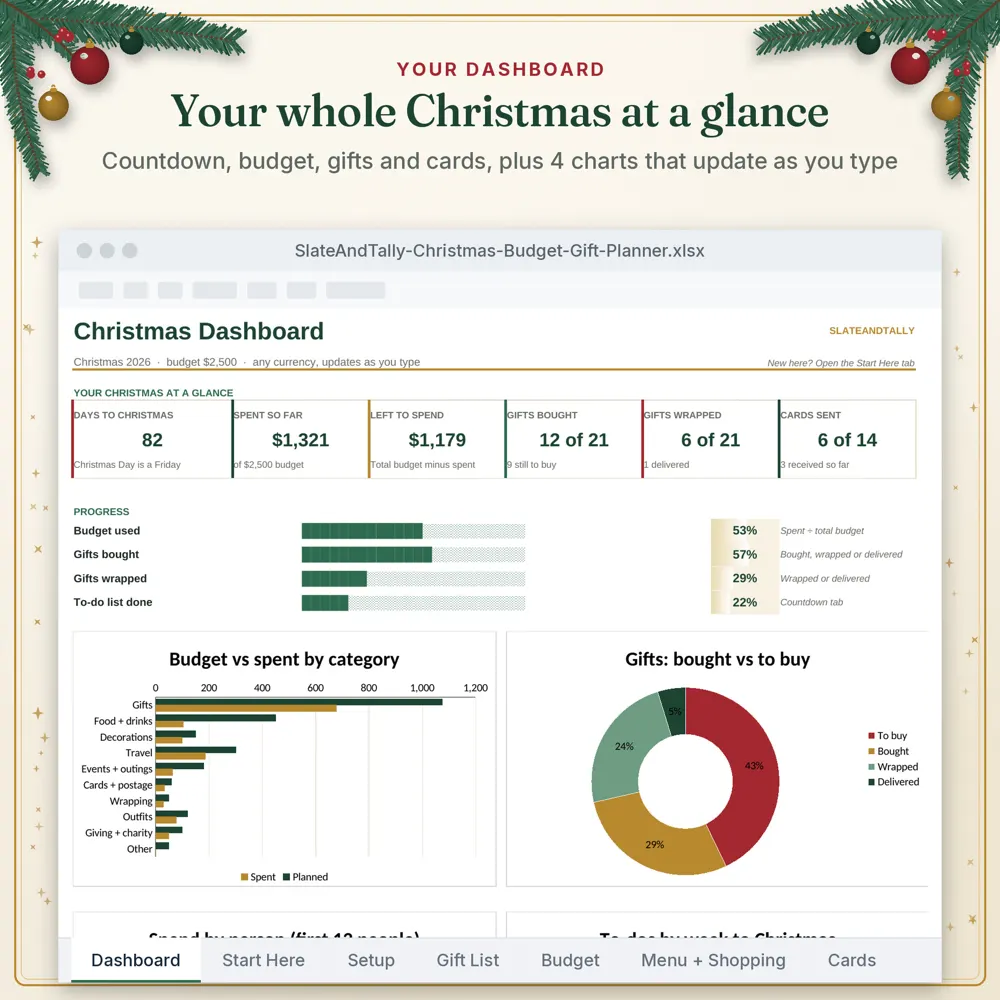
Enter purchases as you make them. A dashboard that shows total budget vs spent, budget by category and gifts bought makes it obvious when to slow down, and that's far easier than tallying receipts afterwards.
Ways to keep Christmas costs down
- Agree on spending limits with family early.
- Use Secret Santa for big groups.
- Give experiences or homemade gifts.
- Start a Christmas sinking fund in January: saving a small amount each pay makes next year easy.
- Avoid buy now, pay later for gifts unless it's already in your budget.
Christmas budget template: Excel or Google Sheets?
Google Sheets is great if a partner or family shares the planning, because everyone sees the same list. Excel works well offline. Our planner works in both and in any currency.
Our Christmas Budget Planner
The SlateAndTally Christmas Budget Planner Spreadsheet has 8 tabs: Dashboard, Countdown, Budget, Gift List, Cards, Menu & Shopping, Setup and Start Here. The charts update as you type, and it works in Excel and Google Sheets in any currency.
A worked example
Say you decide on a total of $1,200 and have six fortnightly pays before Christmas. That's $200 a pay into a separate Christmas account. You might split the $1,200 as $650 for gifts, $300 for food, $80 for decorations, $60 for cards and wrapping, and $110 for events and travel. With ten people on the gift list, the $650 could be $100 each for two partners or parents, $50 each for four kids, and $25 each for four friends or teachers, with $50 left as a buffer for the gift you forgot. (These numbers are just an example; use your own.)
As you shop, each purchase goes into the gift list or budget tab. If the kids' gifts come in $40 over, the dashboard shows it, and you can take that from decorations rather than reaching for the credit card.
Don't forget the hidden Christmas costs
The costs that usually blow a Christmas budget aren't the big gifts. They're the small extras that never got a line: postage for interstate parcels, batteries, gift cards for teachers and coaches, a contribution to the work collection, a new outfit for the party, extra petrol for visiting family, and the second grocery run on Christmas Eve. Give these a line in your planner from the start, even if it's a small amount, and the total becomes far more realistic.
After Christmas: set up next year
In early January, while it's fresh, note what you actually spent in each category and who you bought for. Then divide next year's total by 26 (or by the number of pays you get) and start a small automatic transfer. By next December the money will already be there.
Frequently asked questions
How do I set a Christmas budget?
Start with a total you can afford without borrowing, split it into categories (gifts, food, decorations, cards, events), then give each person on your gift list a limit.
When should I start saving for Christmas?
As early as you can. Dividing your total by the number of pays left before Christmas gives you a per-pay amount to set aside.
Is there a Christmas budget template for Google Sheets?
Yes. Our Christmas Budget Planner is an Excel file that also opens in Google Sheets.
What should a Christmas budget include?
Gifts, food and drink, decorations, cards and wrapping, postage, and events or travel.