
Debt payoff spreadsheet: snowball vs avalanche, and how to find your debt-free date
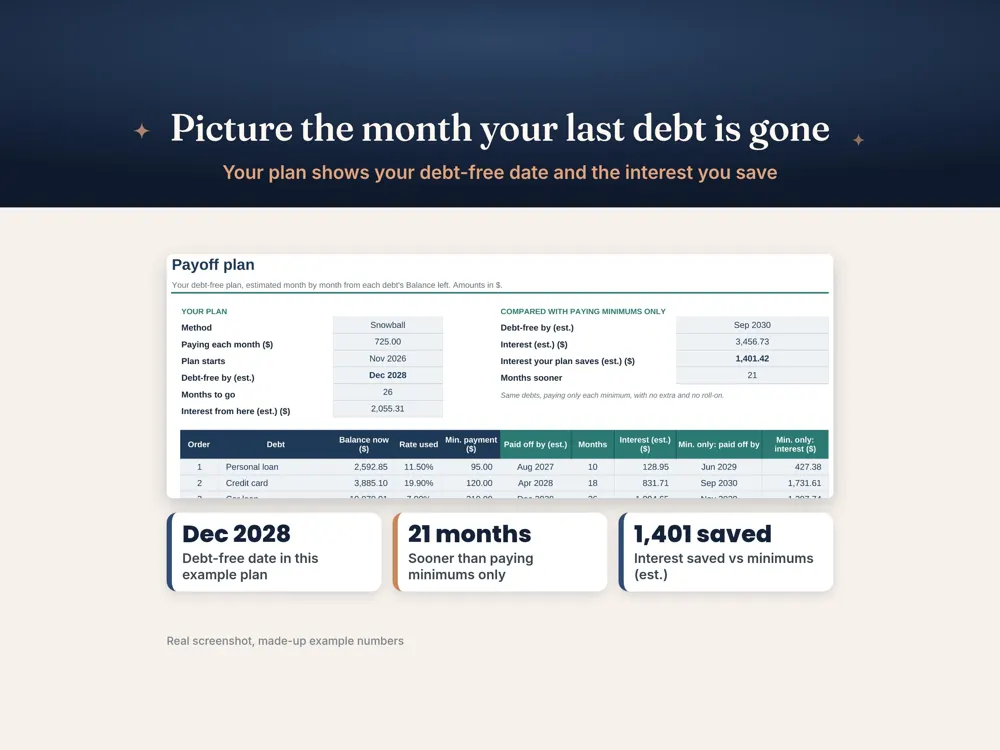
When you owe money on several cards and loans at once, the hardest part is often not the money: it's not knowing where to start or when it will end. A debt payoff spreadsheet answers both. It lists every debt, puts them in a payoff order, and shows the month you'll be debt-free if you stick to the plan. Seeing that date, and watching the balances fall, is a big part of why people stay motivated.
Step 1: List every debt
For each debt, write down the lender, current balance, interest rate and minimum repayment. Include credit cards, personal loans, car loans, buy now pay later plans and money owed to family. Leave out your mortgage unless you're specifically planning to pay it off early.
Step 2: Choose a method
Debt snowball: pay the minimum on everything and put every extra dollar on the smallest balance first. When it's gone, roll that payment into the next smallest. You get quick wins, which many people find keeps them going.
Debt avalanche: put extra money on the highest interest rate first. Mathematically this costs the least interest overall and is usually faster, though the first win may take longer.
Neither is wrong. The best method is the one you'll stick with. A good spreadsheet lets you switch between them and compare total interest and payoff dates side by side.
Step 3: Find your extra payment
Your plan works by putting a fixed extra amount, on top of the minimums, toward one target debt. Look at your budget for money you can redirect, such as a cancelled subscription, a lower grocery target or a three-paycheck month. Even a small, consistent extra payment changes the payoff date noticeably.
Step 4: Log payments and watch the date move
Each time you pay, record it. Progress bars and a falling total balance are surprisingly motivating, and any extra payment pulls your debt-free date closer.
Tips that make a payoff plan stick
- Stop adding new debt: consider removing saved cards from shopping sites.
- Keep a small emergency fund so a surprise bill doesn't go on the card.
- Call your lenders to ask about a lower rate or hardship options if you're struggling.
- In Australia, free and confidential help is available from the National Debt Helpline on 1800 007 007 (ndh.org.au).
Excel or Google Sheets?
Both handle the maths well. Google Sheets lets you update it from your phone straight after making a payment, and Excel suits offline use.
Our Debt Payoff Tracker
The SlateAndTally Debt Payoff Tracker Spreadsheet handles up to 10 debts, lets you choose snowball or avalanche order, logs payments, and shows your debt-free date with progress bars. It includes a fillable PDF payoff planner (A4 and US Letter) and works in Excel and Google Sheets in any currency.
A worked example
Imagine three debts: a credit card with $2,400 at 20% interest, a personal loan with $6,000 at 12%, and a buy now pay later balance of $600 at 0%. The snowball method targets the $600 balance first because it's smallest, clearing it fast and freeing up its repayment. The avalanche method targets the credit card first because it charges the most interest. If you have an extra $150 a fortnight to put toward debt, both methods clear everything well ahead of minimum-only repayments. Avalanche will typically cost a little less interest, while snowball delivers the first win sooner. (These figures are an illustration only; your spreadsheet will calculate your real numbers.)
What to do once a debt is paid off
Don't absorb the freed-up repayment back into everyday spending. Roll the whole amount, minimum plus extra, onto the next debt in your order. That's what creates the snowball (or avalanche) effect: your payment grows every time a debt disappears, so later debts fall much faster than the first.
Staying motivated
Debt payoff can take months or years, so build in markers. Celebrate each cleared balance in a small, free way, keep your debt-free date somewhere visible, and review the plan each payday. If your income changes, update the extra payment and let the spreadsheet recalculate rather than abandoning the plan.
Frequently asked questions
Which is better, debt snowball or avalanche?
Avalanche usually saves more interest; snowball gives faster early wins. The best choice is the one you'll keep doing.
How do I calculate my debt-free date?
List each balance, interest rate and payment, then apply your extra payment to one debt at a time. A debt payoff spreadsheet does this month by month for you.
Does the debt tracker work in Google Sheets?
Yes. The .xlsx file opens in Excel or Google Sheets.
Where can I get free debt help in Australia?
The National Debt Helpline (1800 007 007, ndh.org.au) offers free, confidential financial counselling.