
Free biweekly budget spreadsheet: budget every paycheck with confidence
If you're paid every other Friday, a monthly budget never quite lines up with your bank account. Rent might be due right before payday, and your credit card bill lands in the middle of a lean week. A biweekly budget, sometimes called a paycheck budget, plans your money one paycheck at a time so every bill has a paycheck assigned to cover it.
Below you'll find a step-by-step method, the maths for converting bills, a plan for the two "extra" paychecks each year, and a free biweekly budget spreadsheet you can use in Excel or Google Sheets.
What is a biweekly budget?
A biweekly budget assigns your bills, spending and savings to each of your 26 paychecks a year. Instead of asking "what can I afford this month?", you ask "what does this paycheck need to cover before the next one?" That small shift removes most of the end-of-month panic, because you can see in advance which paycheck handles rent, which handles the car payment and how much is left for groceries in between.
Step 1: List your paychecks and due dates
Open a calendar and write down your next several paydays. Then list each bill with its due date. Match each bill to the paycheck that arrives before it's due. Big bills like rent can be split: set aside half from each paycheck so the full amount is ready on time.
Step 2: Convert bills to a per-paycheck amount
- Monthly bill: × 12 ÷ 26 (e.g. $1,300 rent = $600 per paycheck).
- Weekly cost: × 2.
- Annual cost (insurance, subscriptions, holidays): ÷ 26.
Saving the per-paycheck amount for every bill means you're never caught short, even when two bills land in the same week.
Step 3: Give every dollar a job
Subtract fixed bills from your take-home pay, then plan groceries, gas, fun money, debt payments and savings until the remainder is zero. This is the zero-based approach, and it works especially well with biweekly pay because the numbers are smaller and easier to picture.
Step 4: Track planned vs actual
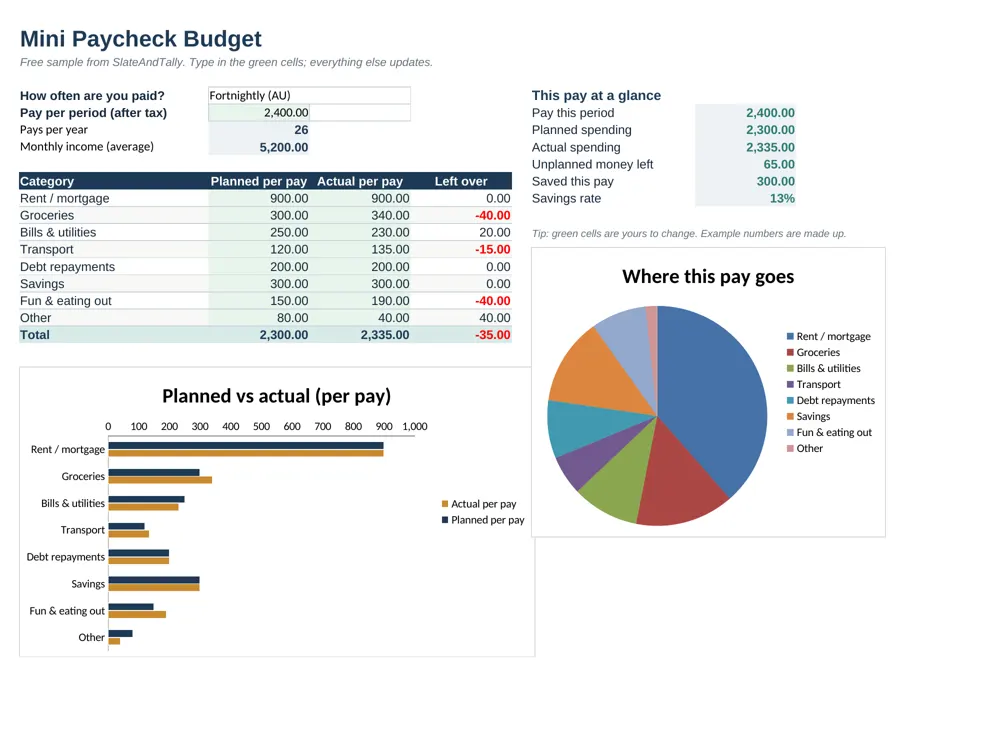
On payday, spend five minutes entering what you actually spent last period. The difference column shows where you went over or under, and that feedback is what improves your next plan. In our free spreadsheet, over-budget categories turn red and the charts update instantly, which makes patterns obvious if you're a visual person.
What to do with three-paycheck months
With 26 paychecks a year, two months will contain three paydays. If your budget already covers every bill from two paychecks a month, the third paycheck is free money. Popular uses: building a starter emergency fund, an extra debt payment using the snowball or avalanche method, funding a sinking fund for holidays, or simply getting one paycheck ahead so next month's bills are covered in advance.
Biweekly vs semi-monthly: what's the difference?
Biweekly means every two weeks (26 paychecks). Semi-monthly means twice a month on set dates, like the 15th and the last day (24 paychecks). The amounts differ, so pick the right option. Our free sheet includes Biweekly (US), Twice a month, Weekly, Fortnightly and Monthly, and calculates pays per year for you.
How to use the free biweekly budget spreadsheet
- Download the free sheet below and open it in Excel, or upload it to Google Drive and open it with Google Sheets.
- Choose Biweekly (US) in cell C4.
- Enter your take-home pay per paycheck.
- Fill in planned and actual amounts for each category and rename categories to suit you.
- Check the "at a glance" box for money left and your savings rate.
Want the whole year in one file?
The free version handles one paycheck at a time. The full SlateAndTally Biweekly Paycheck Budget Spreadsheet (US edition) tracks every paycheck of the year with a dashboard, spending log, savings goals and charts that update as you type, in Excel and Google Sheets.
A sample biweekly budget
Here's how a $2,400 take-home paycheck might be planned (example figures only): $900 toward rent or mortgage, $300 groceries, $250 bills and utilities, $120 gas and transport, $200 debt payments, $300 savings, $150 fun and eating out, and $80 other. That's $2,300 planned, leaving $100 unassigned that you can add to savings or a sinking fund. Those are exactly the example numbers in the free sheet, so you can see how it works before typing in your own.
Frequently asked questions
How many biweekly paychecks are in a year?
26, which means two months each year include a third paycheck.
Is this biweekly budget spreadsheet really free?
Yes. Enter your name and email on this page and you get the download link straight away. There's no payment and no trial.
Does it work in Google Sheets?
Yes. Upload the .xlsx file to Google Drive and open it with Google Sheets. The formulas and charts carry over.
What's the difference between biweekly and semi-monthly pay?
Biweekly is every two weeks (26 paychecks a year). Semi-monthly is twice a month on fixed dates (24 paychecks a year).