
Wedding budget spreadsheet: how to plan, track and stay on budget
Weddings are made of dozens of separate purchases, each with its own quote, deposit, balance and due date. Without one place to see it all, it's easy to approve the venue, the photographer and the florist individually and only realise later that together they've blown the budget. A wedding budget spreadsheet keeps every estimate, quote and payment in one view so you can make trade-offs early, while they're still easy.
Step 1: Agree on the total
Before you book anything, sit down together (and with any family who are contributing) and agree on a total number. Be clear about who is paying for what. It's the most important conversation in wedding planning, and having the figure in a shared spreadsheet keeps everyone on the same page.
Step 2: Split the total across categories
Common categories include venue and catering, attire, photography and video, flowers and styling, music and entertainment, stationery, rings, hair and makeup, transport, celebrant and legal fees, cake, favours and gifts, and the honeymoon. Venue and catering are usually the largest share, and guest numbers drive them, so settle the guest list before locking in other big costs.
Step 3: Track estimated vs actual
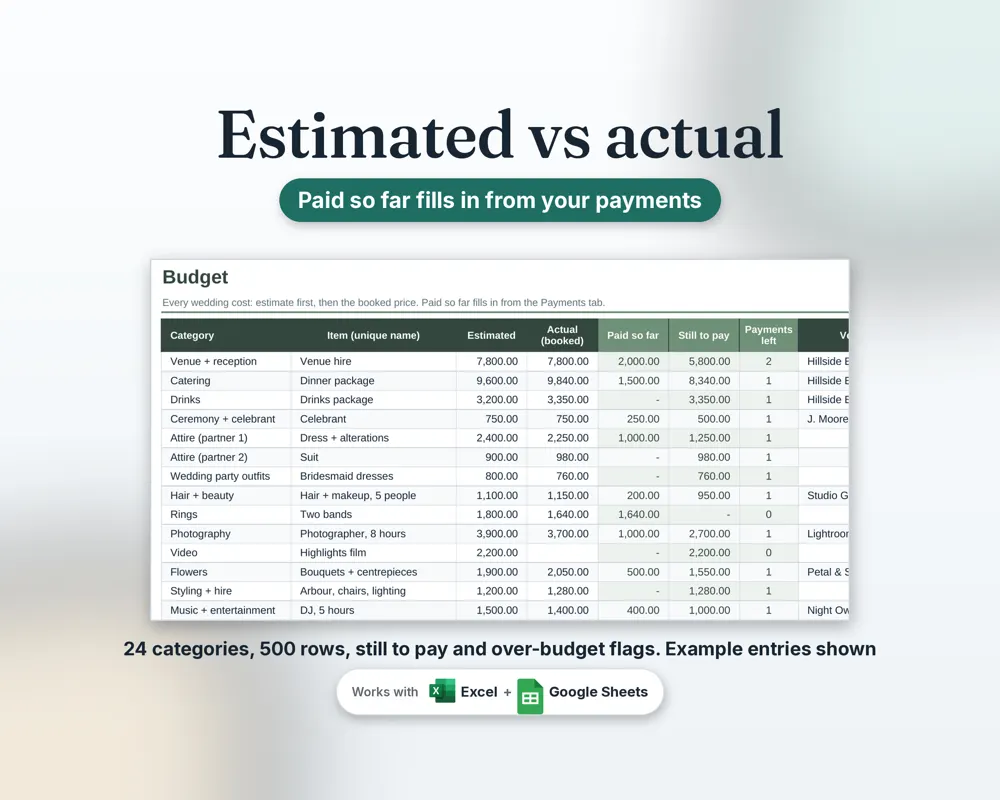
For each item, record your estimate, then update it with the real quote and, finally, the actual cost. The gap between estimated and actual is your early-warning system. If photography comes in over, you'll see it straight away and can trim styling or favours to compensate.
Step 4: Build a payment schedule
Most suppliers ask for a deposit at booking and the balance closer to the date. Log each payment with its due date so nothing sneaks up on you, and so you can see how much is still to pay in total. This is especially useful when deposits are spread across 12 to 18 months.
Step 5: Keep a contingency
Set aside a buffer (many planners suggest around 5 to 10% of the total) for the things nobody plans for: extra guests, alterations, last-minute hire items or price rises. If you don't use it, it becomes honeymoon money.
Ways to make the budget go further
- Trim the guest list first: it reduces catering, seating, stationery and favours at once.
- Consider off-peak days or months, which some venues price differently.
- Ask what's included in a venue package before hiring extras separately.
- Prioritise: pick your top three things and spend less on the rest.
- Use digital invitations or print at home.
Why a spreadsheet beats a notebook or an app
A spreadsheet adds everything up automatically, flags over-budget items and can be shared with your partner in Google Sheets so you're both editing the same file. Unlike many apps, there's no subscription and your data stays in your own file.
Our Wedding Planner Spreadsheet
The SlateAndTally Wedding Planner Spreadsheet includes a budget with 24 categories and estimated vs actual columns, a payment schedule that shows what's still to pay, over-budget flags, a dashboard with charts, plus a guest list with RSVPs, a seating chart, a planning checklist and a day-of schedule. It works in Excel and Google Sheets, in any currency, so it suits couples in Australia, the UK and the US.
A simple way to allocate the budget
Start with your total, take off your contingency, and allocate the rest in order of priority. List the three things that matter most to you as a couple, maybe the photographer, the food and the band, and fund those properly first. Then share what's left across the remaining categories. If the numbers don't work, change guest numbers or the venue choice before cutting your top three, because those two decisions move the budget the most.
Questions to ask every supplier
- What exactly is included in the quote, and what costs extra?
- How much is the deposit, and when is the balance due?
- Is the deposit refundable, and what is the cancellation or postponement policy?
- Are there surcharges for Sundays, public holidays or travel?
- Is the price inclusive of GST?
Record the answers in your spreadsheet notes column. When you compare three photographers or venues later, you'll be comparing like with like.
Keep the guest list and budget connected
Every guest adds a per-head cost for catering and drinks, plus a share of chairs, stationery and favours. Keeping your guest list and RSVPs in the same file as your budget means you can see the effect of adding a table before you commit, and update catering numbers as RSVPs arrive.
Frequently asked questions
What should be included in a wedding budget?
Venue and catering, attire, photography, flowers, music, stationery, rings, hair and makeup, transport, celebrant fees, cake, favours and the honeymoon, plus a contingency buffer.
How do I track wedding deposits and payments?
Log each supplier's deposit and balance with due dates in a payment schedule, so you can see the total still to pay at any time.
Can we share a wedding budget spreadsheet?
Yes. Upload it to Google Drive and open it with Google Sheets, then share it with your partner so you both edit the same file.
Does the spreadsheet work outside Australia?
Yes. It works in any currency, so it suits couples in Australia, the UK, the US and elsewhere.