
Fortnightly budget template for Australia: how to budget pay by pay
Most Australians on a wage are paid fortnightly, yet most budget templates online are built around a calendar month. That mismatch is why so many budgets fall apart by the third week: rent is due monthly, the phone bill is due on the 14th, groceries happen every week, and your pay lands every second Thursday. A fortnightly budget template fixes this by planning every dollar around the thing you actually control, which is each pay.
This guide explains how a fortnightly budget works, how to convert monthly and yearly bills into fortnightly amounts, what to do with the two "extra" pays each year, and how to set it up in Excel or Google Sheets in about 15 minutes. You can grab our free Mini Paycheck Budget below to follow along.
Why budget by fortnight instead of by month?
There are 26 fortnights in a year, not 24. If you divide your annual bills by 24 because "it's two pays a month", you'll overestimate what you need from each pay and never notice the slack. If you budget your monthly pay as "two pays", you'll come up short in some months. Budgeting per fortnight keeps the maths honest:
- Weekly bills (groceries, fuel): multiply by 2.
- Monthly bills (rent, phone, subscriptions): multiply by 12, then divide by 26.
- Quarterly bills (electricity, water): multiply by 4, then divide by 26.
- Yearly bills (car rego, insurance, school fees): divide by 26.
For example, a $1,950 monthly rent works out to $1,950 × 12 ÷ 26 = $900 per fortnight. Set that aside every pay and the rent money is always there, whichever pay the due date falls in.
How to set up a fortnightly budget in 5 steps
- Write down your take-home pay per fortnight. Use the amount that lands in your bank after tax, super and salary sacrifice, not your salary.
- List your fixed costs and convert each to a fortnightly figure using the rules above. These are rent or mortgage, loan repayments, insurance, phone, internet and subscriptions.
- Set flexible spending for groceries, fuel, eating out and personal spending. Look at your last two bank statements for realistic numbers.
- Pay savings like a bill. Pick a fixed amount for an emergency fund or goal and put it near the top of the list.
- Track actuals each payday. Five minutes on payday comparing planned and actual spending is the habit that makes a budget work.
What about the months with three pays?
Because 26 fortnights don't divide evenly into 12 months, two months a year contain three paydays. If your budget is per fortnight, those months don't need special handling: every pay already covers its share of the bills. The "third pay" in those months is essentially a bonus you can point at a single goal, like topping up an emergency fund or knocking down a credit card. Many people mark those two dates in their calendar at the start of the year.
Sinking funds: the secret to stress-free bills
A sinking fund is money set aside each pay for a cost you know is coming but don't pay often, like car registration, Christmas, birthdays or the annual insurance renewal. Divide the yearly cost by 26 and move that amount into a separate savings account each payday. When the bill arrives, the money is already waiting. Most Australian banks let you open extra savings accounts with nicknames for free, which makes this easy to run.
Excel or Google Sheets?
Both work. Excel is handy if you prefer working offline on a laptop. Google Sheets is free, runs in a browser and on your phone, and makes it easy for a couple to share one budget. A well-built template opens in either: you upload the .xlsx file to Google Drive and open it with Google Sheets, and the formulas carry over.
Our free Mini Paycheck Budget lets you choose Fortnightly (AU) from a dropdown. It converts your pay into a monthly average, shows planned vs actual spending for eight categories, and draws a bar chart and a pie chart that update as you type.
When to upgrade to a full fortnightly budget planner
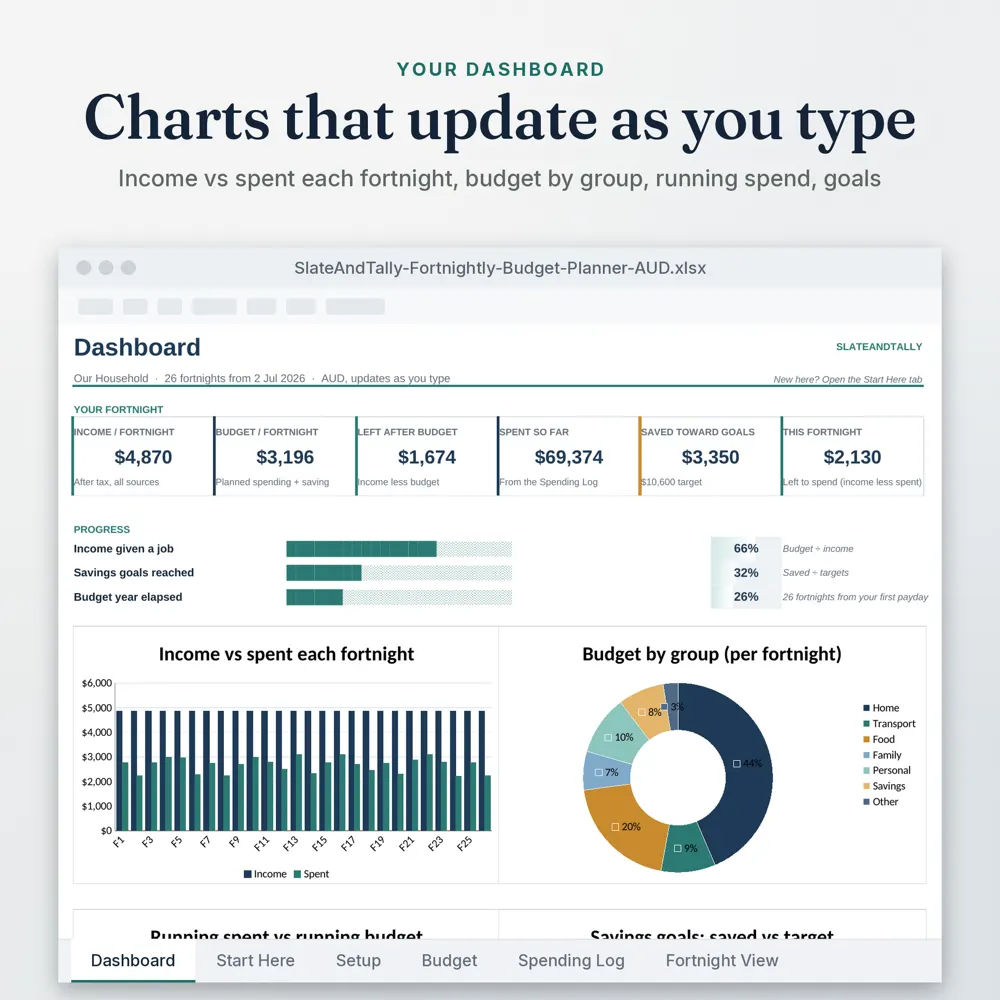
The free sheet covers one pay at a time, which is perfect for getting started. If you want to track a whole year, the full SlateAndTally Fortnightly Budget Spreadsheet adds a dashboard with income vs spend per fortnight, a spending log, a budget for every fortnight of the year, savings goals with progress bars, and a fortnight view. It works in Excel and Google Sheets and comes with a Quick-Start PDF.
Common mistakes to avoid
- Budgeting from your gross salary instead of take-home pay.
- Forgetting irregular costs (rego, gifts, school costs) until they hit.
- Setting grocery targets you've never actually hit. Start realistic and trim later.
- Giving up after one bad fortnight. Adjust the plan rather than abandoning it.
A quick example
With $2,400 take-home pay per fortnight (example only), you might plan $900 rent, $300 groceries, $250 bills, $120 transport, $200 debt repayments, $300 savings, $150 fun and $80 other. The free sheet comes filled in with these numbers, so you can see the charts working before you replace them with your own.
Frequently asked questions
How do I convert a monthly bill to fortnightly?
Multiply the monthly amount by 12 and divide by 26. For example, $130 a month is $130 × 12 ÷ 26 = $60 per fortnight.
How many pays are in a year if I'm paid fortnightly?
26. That means two months each year include three paydays.
Is there a free fortnightly budget template for Google Sheets?
Yes. Our free Mini Paycheck Budget is an .xlsx file that opens in Excel or Google Sheets and includes a Fortnightly (AU) option.
Does the template work for New Zealand?
Yes. The sheet doesn't assume a currency or tax system, so it works for any fortnightly pay cycle, including NZ.