Home › Excel Budget Template: Build One for Aussie Pay (with Formulas)
Excel Budget Template: Build One for Aussie Pay (with Formulas)
Excel is still one of the best places to budget: it's flexible, it works offline, and the formulas do the boring sums. Here is how to build an Excel budget template for fortnightly pay, with every formula you need, plus a free .xlsx to start from.
Download a free Excel budget template
If you'd rather start from a working file, our free Fortnightly Budget Mini (.xlsx) opens in Excel. It's a one-page budget for one pay that converts weekly, monthly, quarterly and yearly bills into what to set aside each payday. It's genuinely free, and there's also a printable PDF. Want to build your own? Read on.
Step 1: set up the columns
Open a blank workbook and type these headings in row 1:
| Column | Heading | What goes in it |
|---|---|---|
| A | Item | Rent, groceries, phone and so on |
| B | Category | Housing, Food, Transport, Bills, Sinking fund, Savings, Lifestyle |
| C | Amount | The amount on the bill, in A$ |
| D | Times per year | 52 weekly, 26 fortnightly, 12 monthly, 4 quarterly, 1 yearly |
| E | Per fortnight | The formula below |
| F | Actual | What you really spent this pay |
Layout suggestion.
Step 2: the per-pay formula
In E2 type =C2*D2/26 and fill it down. That's the whole trick: amount × times per year ÷ pays per year. Paid weekly? Use /52. Monthly? Use /12. Even better, put your number of pays per year in a cell such as H1 and use =C2*D2/$H$1, so you can switch the whole template between weekly, fortnightly and monthly by changing one number.
Step 3: stop typos with a dropdown
Select column D, go to Data › Data Validation, choose List and type 52,26,12,4,1. Now every row has a dropdown and nobody can type "monthly" where a number should be. Do the same for column B with your category names.
Step 4: totals by category with SUMIF
Make a small summary table. List each category in column H (from H3), and in I3 type =SUMIF($B:$B,H3,$E:$E). Fill it down to see the per-pay total for each category. Add a total income cell, then =income-SUM(I3:I9) to show what's left. If that number goes negative, Excel has just told you the plan doesn't fit.
Step 5: highlight overspending
Select the Actual column, choose Home › Conditional Formatting › New Rule › Use a formula, and enter =F2>E2 with a red fill. Any category where you spent more than planned turns red. Add a second rule, =F2<=E2, in green if you like the encouragement.
Step 6: a sinking funds tab
Add a sheet called "Sinking funds" with columns for Goal, Target (A$), Due date, Pays left and Per pay. For pays left on fortnightly pay, use =ROUNDUP((C2-TODAY())/14,0), and for per pay use =B2/D2. Now Christmas, rego and the car service each show exactly how much to save every payday.
| Goal | Target | Due | Pays left | Per pay |
|---|---|---|---|---|
| Christmas | A$1,000 | 20 Dec | 4 | A$250 |
| Car rego + CTP | A$880 | 31 Mar | 11 | A$80 |
| Car service | A$450 | 30 Apr | 13 | A$34.62 |
Example figures only. Pays left depend on today's date.
Step 7: protect your formulas
Select the cells you type in (Amount, Times per year, Actual), right-click › Format Cells › Protection and untick Locked. Then use Review › Protect Sheet. Your formulas are safe from accidental deletion, and you can still type your numbers.
Excel tips for Aussie budgets
- Set the currency format to $ English (Australia) so amounts display correctly.
- Use a separate column for the bill's due date and sort by it to see which pay covers what.
- Keep one tab per year. Copy the tab each July if you also track tax-time items, since the Australian financial year runs 1 July to 30 June.
- Save a copy before big changes. Excel's version history works if the file is on OneDrive.
Excel, Google Sheets or an app?
Excel is great if you like full control and have a computer handy. It's fiddlier on a phone. If you share the budget with a partner, Google Sheets makes sharing easier. If you'd rather skip formulas entirely, a ready-made app does the per-pay maths for you.
Add a simple chart
Select your category summary (the category names and their per-pay totals), then choose Insert › Pie or Insert › Bar. A bar chart is usually easier to read than a pie when you have more than five categories. Put the chart on its own tab called "Dashboard" so you can see the big picture at a glance. If you track actuals, a clustered bar chart of Planned vs Actual by category shows exactly where the money leaks.
Common Excel budget mistakes
- Typing numbers as text: if a cell shows a little green triangle, Excel isn't counting it. Re-enter it as a number.
- Totals that skip new rows: use whole-column references like
$E:$E, or turn your list into a Table (Insert › Table) so totals grow automatically. - Hard-coded 26s everywhere: keep the pays-per-year number in one cell so a change of pay cycle is one edit.
- No backup: save the file to OneDrive or email yourself a copy each month.
Finally, give the file a clear name such as Budget 2026-27.xlsx and pin it somewhere you'll see it. A template you open every payday beats a clever one you forget about.
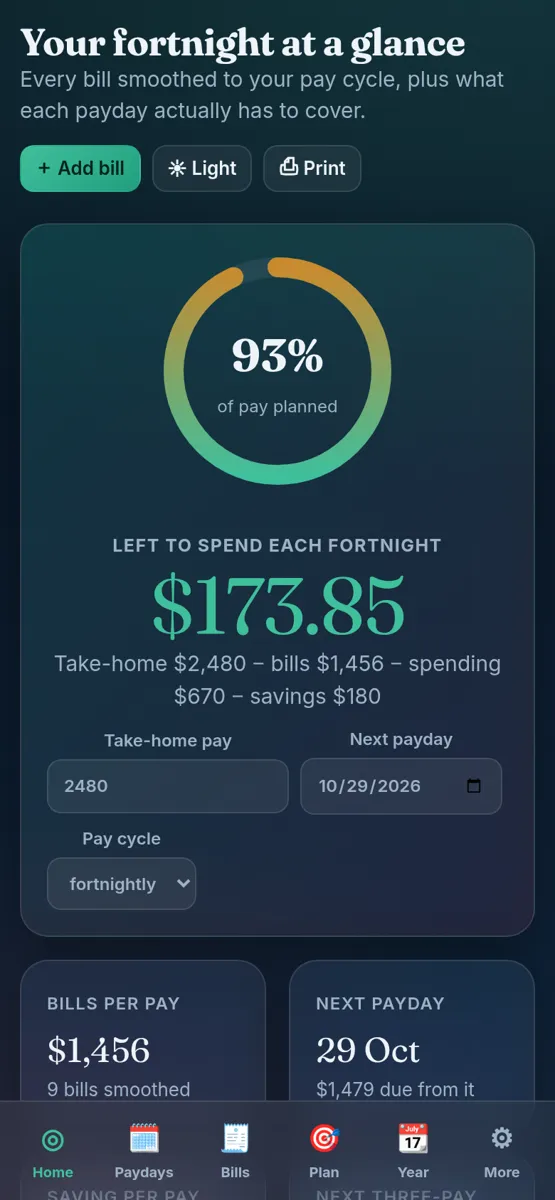
Our paid apps are a different kind of tool to a spreadsheet. Each one is a single HTML file you open in your web browser on a computer, Android phone or iPhone. There's nothing to install, it works offline, your data stays on your own device, and you can export a backup file from Settings. It's a one-off purchase with an instant download, not a subscription.


More spreadsheet options: our Excel and Google Sheets templates, the Fortnightly Budget Spreadsheet, and the budget spreadsheet guide.
General information only, not financial or tax advice.
FAQ
Is there a free Excel budget template?
Yes. Our Fortnightly Budget Mini is a free .xlsx that opens in Excel, plus a printable PDF.
What is the formula to convert a bill to fortnightly in Excel?
Amount × times per year ÷ 26. For example =C2*D2/26, where D2 is 12 for a monthly bill.
How do I total categories in an Excel budget?
Use SUMIF, for example =SUMIF($B:$B,H3,$E:$E), which adds the per-pay amounts for the category named in H3.
Does the free template work in Google Sheets too?
Yes. Upload the .xlsx to Google Drive and open it with Google Sheets.